Getting the Most Out of Claude Fable 5.1
- Find out which seat you have. On Team plans, Premium seats include Fable 5.1, up to half of the weekly usage limit. On Standard seats, Fable 5.1 runs on pay-as-you-go usage credits.
- Owners: set the spend limits. In Organization settings > Usage, enable usage credits and set the monthly limit and the individual limits for heavy users.
- Give Fable a hard task. Something that needs judgment, draws on a lot of material, and takes many steps. Set the effort to High or Extra high.
- Brief Fable like a capable colleague. Share the files, connect the apps it needs, and describe the goal and what a strong result looks like. Or talk the task through and have Claude write the prompt.
- Check Fable's work. Ask for a plan before a big job and sources along the way, and read everything before it's sent anywhere.
Fable 5.1 on a Team plan
What Fable 5.1 costs depends on the seat. Premium seats include it, and each person can use up to half of their weekly usage limit on it at no extra cost. After that, they can keep going on usage credits or switch to another model. Standard seats don't include Fable 5.1, so it runs on pay-as-you-go usage credits from the first message. Fable also uses up weekly limits faster than other Claude models.
For Owners: usage credits and spend limits. Usage credits, the monthly spend limit, and the individual spend limits are all set in Organization settings > Usage.
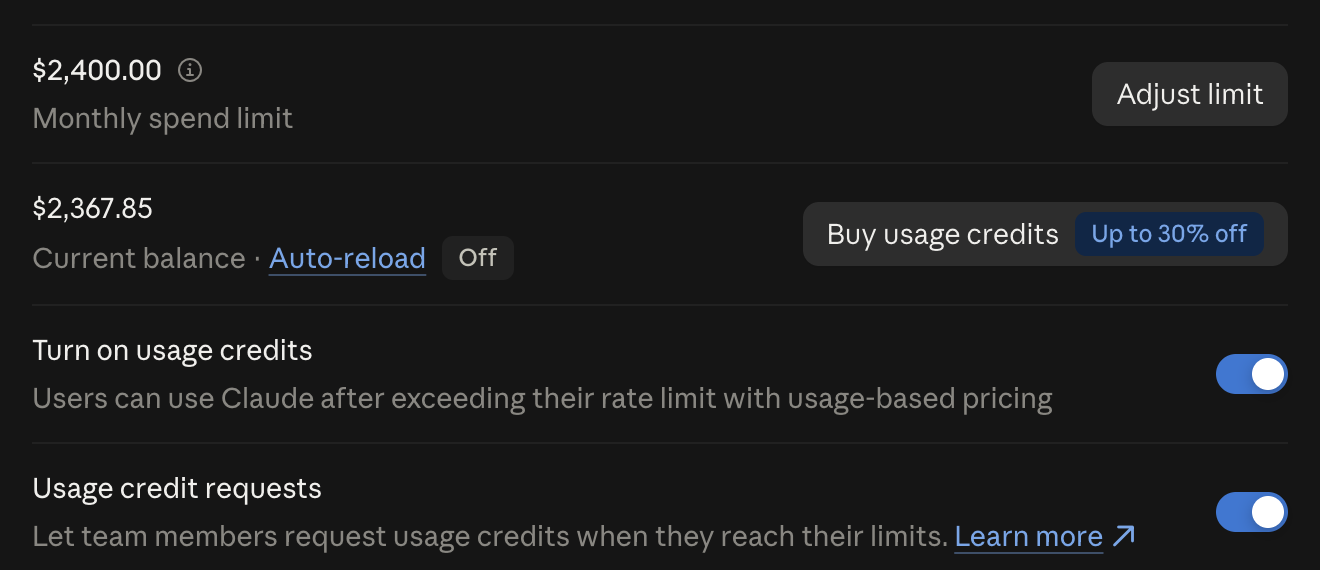
- Monthly spend limit. Set it high enough to cover the Fable work planned. Otherwise usage gets cut off partway through a project.
- Individual spend limits. Under Spend limits by user, raise the limit for anyone who'll be using Fable heavily.
- Auto-reload. With auto-reload turned off, nothing can be spent beyond the credits already in the balance.
What Fable 5.1 is good at
Fable 5.1 is one of Anthropic's most capable generally available models. Anthropic's guidance is to save it for the hardest and most important tasks, especially jobs that involve several tools and a series of judgment calls.
A hard task usually has one or more of these qualities:
- It needs judgment. Weighing tradeoffs, spotting what's missing, or making a recommendation that would normally come from a senior person.
- It depends on a lot of context. Many files, long email threads, a year of reports, or background that would take an hour to explain.
- It takes many steps that build on each other. Research, then analysis, then a draft, then revisions, with each step depending on the last.
- The stakes are high. An important decision, a major proposal, or a board presentation will be based on the answer.
Most people don't give AI hard enough tasks. Hand Fable something messy or unclear or that would take hours to finish, and see what it does.
Example projects to give Fable
A budget or strategic planNext year's budget built from this year's actuals, or a strategic plan built from the firm's own files, financials, and past proposals.
Synthesis across a large pile of materialA year of client reports, meeting transcripts, survey results, or won and lost proposals, with a request for patterns and what to change.
A major proposal or RFP responseDrafted from the firm's strongest past work and the prospect's own materials.
A tune-up of the firm's Claude setupGive it the skills, Project instructions, and knowledge files, and ask it to find gaps and contradictions and rewrite the weak ones.
A second opinion on a big decisionGive it the full context and ask it to argue against the preferred option and find what's missing.
Business data with a question behind itPipeline, utilization, or financial spreadsheets, with a request to explain what's driving the numbers.
A stubborn technical problemFor whoever runs the firm's systems, point it at an automation, integration, or internal tool that keeps breaking and ask it to find the root cause.
Setting up Fable 5.1
Choose Fable 5.1 from the model picker next to the send button. In Cowork, update Claude Desktop to the latest version first.
Fable 5.1 defaults to Medium effort in chat and Cowork. For a substantial project, click the model name, choose Effort, and pick High or Extra high. Effort can be changed at any point in a conversation, and the change applies from the next response.
Effort levels. At higher effort, Fable plans more before it starts and checks in more as it goes. Answers are more thorough, but they take longer and use up limits and credits faster.
- Low and Medium
- Routine tasks and quick back-and-forth, at the lowest cost.
- High
- The best overall balance of quality and speed.
- Extra high
- Long-running jobs where Claude works through many steps on its own, like a big Cowork or Claude Code task. Claude reasons more deeply than at High, at a lower cost than Max.
- Max
- The most thorough and the slowest. Use it for the hardest tasks, where accuracy is critical.
Start each unrelated task in a fresh conversation. Claude rereads the whole conversation with every message, so a longer session uses up limits and credits faster.
Files and connected apps
Fable works from the context it has: the prompt, the files shared with it, and any connected apps. The more material it can read, the less it has to guess, and the better it can check its own work.
Put everything relevant to a project in a Claude Project or a Cowork folder, including drafts, notes, data, and past versions.
Show it a draft and the final version. Give Claude an early draft alongside the final version it became, and it can work out the firm's standards from what changed between the two.
With connectors, Claude can also reach the apps the firm already runs on: email, calendars, shared drives, and team chat, including Gmail, Google Drive, Slack, and Box. Once they're connected, Fable notices when an answer is in a calendar or a chat thread and goes and gets it, so nobody has to find and upload it first.
Connected apps don't need to be named in every prompt. When a request involves information stored in one, Claude can search it without being asked.
To add a connector, go to Customize > Connectors.
Writing a good prompt
Anthropic's advice is to brief Fable like a highly capable colleague: explain the situation, agree on what a strong result looks like, and let it work.
Describe the goal rather than the steps. With a list of steps, Fable sticks to the steps already thought of. With a goal, it has room to find a better path. Spell out the steps only when the process has to be done a specific way.
A good prompt covers:
- The goal. The outcome and what it's for.
- The audience. Who the result is for and what it has to accomplish.
- The situation. Background a smart newcomer wouldn't know: what's happened so far, what's been tried, and what's at stake.
- How to judge the result. What a strong result looks like, in terms Claude can check its work against.
- The material. Which files, folders, or connected apps to use.
- Any limits. Length, format, or plain language. Limits help, but Claude makes better calls in situations the limits didn't anticipate when it knows what the work is for.
- Permission to say it doesn't know. Ask it to flag gaps instead of guessing.
Examples help most when a format or tone is easier to show than describe. Claude pays close attention to the details in examples, so use them when the result should look like the example and skip them when it shouldn't be tied to one. When there's no past work to point to, describe how the result will be judged, or ask for three directions with a quick sample of each and react to those.
Talk it through with Claude first. Writing a full prompt from scratch is optional. Talk through the task out loud (dictation works well) or type a rough paragraph, and ask Claude to help pin down the goal or turn it into a prompt. Or add this line and let Claude ask what it needs: “Before you start, ask me everything you need to know to get this right.”
For a big job, ask Fable to lay out its plan before it starts (“Show me your plan before you begin”), and read it. If a step is wrong, correct it before Fable does the work. In Cowork, the plan and Fable's progress then show in the panel beside the conversation.
Checking Fable's work
Fable 5.1 is very capable, and it still makes mistakes. It can misread a number, fill a gap with a plausible guess, or state something with more confidence than the sources support.
- Ask for sources. Have it cite where each fact and figure came from, and quote the source when the exact wording matters. When something looks off, ask: “Where did this figure come from?”
- Ask it to check itself first. Before it hands the work back, have it review the result against the goal and the standard in the prompt and fix what falls short.
- Limit it to the material when that's the point. For an analysis of the firm's own documents, say “Use only the files in this Project,” so Claude doesn't mix in outside information.
- Ask it to research current facts. For anything that changes (regulations, markets, people, prices), ask it to search the web and cite what it finds.
- Get a second review. Open a fresh conversation, give it the finished work and the sources, and ask it to find errors and unsupported claims.
Read it all before sending. Treat Fable's work like a first draft from a sharp colleague. Read every word, and double-check the names, numbers, dates, and quotes before it's sent anywhere.
Fable 5.1 tendencies
Anthropic's prompting guidance for Fable 5.1 lists a few tendencies to watch for. For each one below, there's a line to add to the prompt.
- Stopping to ask. On long jobs, it sometimes stops partway through to ask permission for a step that was already requested. To get the whole job done in one pass, say so: “Work through this end to end without checking in.”
- Dense writing. Its prose can run long and dense. Ask for “plain, straightforward, direct language.”
- Unmarked quotes. When it summarizes documents, it sometimes reuses the source's wording without quotation marks. Ask it to put anything taken word for word in quotes, especially in material a client will see.
Exploring a topic
Fable 5.1 is also good for thinking a topic through before there's anything to produce. Anthropic describes it as a powerful thought partner at that early stage.
With access to the files and connected apps behind the question, it can point out gaps in an idea while the idea is still easy to change and suggest directions nobody had considered. Exploring first is also a good way to settle the goal before writing the prompt for the project.
- Say where the thinking stands. What's known, what isn't, and what decision the exploration will feed. Talking it through out loud works well here.
- Ask for blind spots. “Do a blind spot pass: what should I be asking that I'm not?”
- Ask for options or an interview. “Give me three ways to approach this, with a quick sample of each,” or “Interview me one question at a time.”
- Keep the effort at Medium for back-and-forth. Replies come faster at lower effort. At Low, Fable 5.1 searches less often, so ask it to search when current information would help.
- Hand off with a summary. When the exploration turns into a project, ask Fable to summarize the goal, constraints, and decisions so far, then start the work in a fresh conversation with that summary. Claude then starts with a clean slate and doesn't reread hours of back-and-forth with every message, which uses less of the limits and credits.
Sample prompts
These show the level of detail that gets good results from Fable. Write prompts the same way, or talk the task through and have Claude write the prompt.
A pricing review
We're a 20-person firm, and before we set next year's budget the partners need to decide whether to change how we price retainer work. I'm presenting options at our partner meeting in two weeks. The group is skeptical, so the case has to rest on our own numbers.
The Project has two years of client billing, a utilization export, our current rate card, and notes from three partner meetings where we argued about this. The short version is that our retainers were priced years ago, several clients now take far more time than they pay for, and we're worried that raising prices will cost us our two biggest accounts.
I need a memo of three pages at most that shows which clients are over- and under-priced, lays out two or three pricing approaches with the tradeoffs of each, and recommends one. A strong memo is one where a skeptical partner could check every number against the billing data and still agree with the recommendation. Last year's hiring memo is in the Project too, and the partners found its length and tone persuasive. If the data is too thin to support a conclusion, say so instead of guessing. Before you start, ask me everything you need to know to get this right.
A look at lost proposals
We lost four of the last six proposals where we made the shortlist, and I want to understand why before we write the next one. Everyone here assumes we lost on price, but I'm not sure that's true.
Read the six proposals in our “Proposals 2025-26” folder in Google Drive, search my Gmail for any feedback from those prospects, and use my attached notes from the debrief calls.
I'd like a two-page summary for our leadership team covering what the winning and losing proposals have in common, what the feedback says in the prospects' own words, and three specific changes for our next proposal. Put anything taken directly from a source in quotation marks and note where it came from, so I can check it. If the evidence points somewhere other than price, say so. Work through all six proposals and the feedback before you report back.
Thinking through a new market
We've had three inquiries this year from healthcare organizations, a sector we've never worked in, and the partners are split on whether to pursue it. I'm not asking for a plan or a document yet. I want to think this through with you before our retreat next month.
I know our strengths in the sectors we serve now, and I have a rough sense of what the three inquiries wanted (my notes are attached). I don't know how healthcare organizations buy services like ours, who we'd be competing with, or whether our experience carries over.
Start with a blind spot pass: what should I be asking that I'm not? Then interview me one question at a time. Search the web where current information would help, push back where my thinking looks thin, and tell me when something is a guess.
How this guide was made
Nicholas Tolson at Razzo came up with the guide, set its purpose and audience, and chose what to include. Several of its main points came from him, including the spend-limit steps, the push to give Fable harder work, the emphasis on connected apps, having Claude help write the prompt, and the sections on checking Fable's work and exploring a topic. He reviewed every section and directed the edits across nine drafts and 18 rounds of feedback.
Claude Opus 5 did the research, proposed the structure, and wrote the drafts, including the sample prompts. It read Anthropic's Fable 5.1 announcement, Claude Help Center articles, prompting documentation, and blog posts, and checked each claim against those sources. It also built and uploaded this web page. A separate Claude session reviewed each draft against Razzo's writing standards before Nicholas saw it.
We updated this guide's Team plan details on November 4, 2026. Other facts are current as of September 11, 2026. Anthropic changes plans and settings often, so check the Claude Help Center for anything time-sensitive.